待办事项小程序(1)
这是一个wpf的mvvm模式的练手小程序。
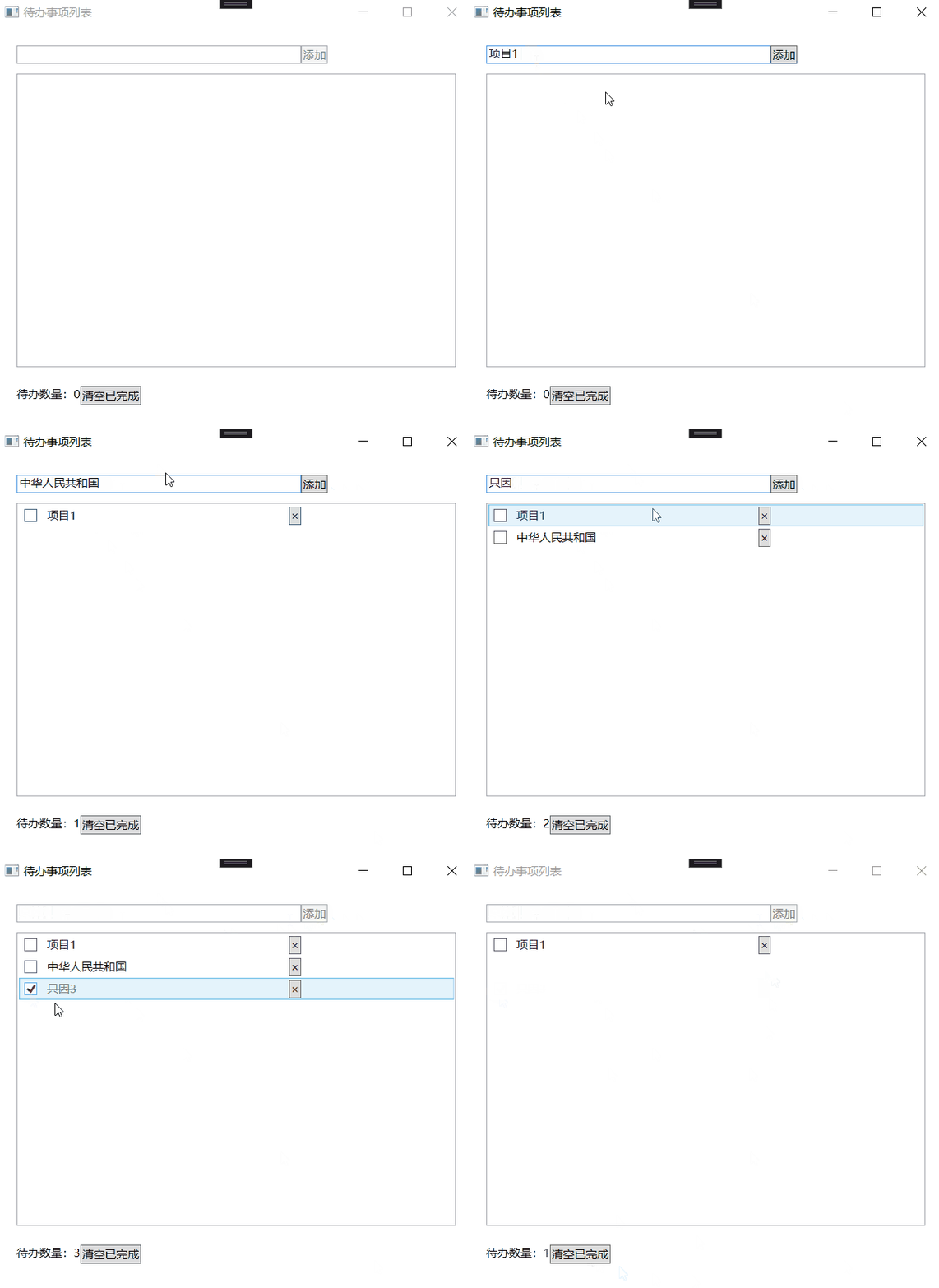
需求:见动图演示
如果勾选,则代表事情完成,文字会加上下划线。
现在没有存盘等额外的功能。
解决方案:
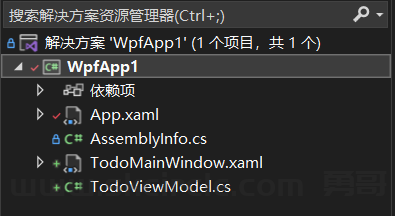
TodoMainWindow.Xaml
<Window x:Class="WpfApp1.TodoMainWindow"
        xmlns="http://schemas.microsoft.com/winfx/2006/xaml/presentation"
        xmlns:x="http://schemas.microsoft.com/winfx/2006/xaml"
        xmlns:d="http://schemas.microsoft.com/expression/blend/2008"
        xmlns:mc="http://schemas.openxmlformats.org/markup-compatibility/2006"
        xmlns:local="clr-namespace:WpfApp1"
        mc:Ignorable="d"
        Title="待办事项列表" Height="450" Width="800">
    <!-- 设置ViewModel为界面数据源 -->
    <Window.DataContext>
        <local:TodoViewModel />
    </Window.DataContext>

    <!-- 布局代码(Grid) -->
    <Grid Margin="20">
        <!-- 输入区:第0行 -->
        <Grid.RowDefinitions>
            <RowDefinition Height="Auto"/>
            <RowDefinition Height="*"/>
            <RowDefinition Height="Auto"/>
        </Grid.RowDefinitions>

        <StackPanel Grid.Row="0" Orientation="Horizontal" Margin="0,0,10,0">
            <TextBox x:Name="txtNewTodo" Width="300"
                     Text="{Binding NewTodoText, UpdateSourceTrigger=PropertyChanged}"/>
            <Button Content="添加" Command="{Binding AddTodoCommand}"/>
        </StackPanel>

        <!-- 待办列表区:第1行 -->
        <ListView Grid.Row="1" ItemsSource="{Binding TodoItems}" Margin="0,10,0,10">
            <ListView.ItemTemplate>
                <DataTemplate>
                    <StackPanel Orientation="Horizontal">
                        <!-- CheckBox只负责勾选状态,文字用独立TextBlock控制样式 -->
                        <CheckBox IsChecked="{Binding IsCompleted}" Width="20" VerticalAlignment="Center"/>

                        <!-- 待办文字:通过DataTrigger控制删除线 -->
                        <TextBlock Text="{Binding Content}"
                           Width="250"
                           VerticalAlignment="Center"
                           Margin="5,0,5,0"> <!-- 左右留5px间距 -->
                            <TextBlock.Style>
                                <Style TargetType="TextBlock">
                                    <!-- 默认样式:无文字装饰 -->
                                    <Setter Property="TextDecorations" Value="None"/>

                                    <!-- 数据触发器:IsCompleted=true时显示删除线 -->
                                    <Style.Triggers>
                                        <DataTrigger Binding="{Binding IsCompleted}" Value="True">
                                            <Setter Property="TextDecorations" Value="Strikethrough"/>
                                            <!-- 可选:完成后文字变灰色,视觉更明显 -->
                                            <Setter Property="Foreground" Value="Gray"/>
                                        </DataTrigger>
                                    </Style.Triggers>
                                </Style>
                            </TextBlock.Style>
                        </TextBlock>

                        <!-- 删除按钮 -->
                        <Button Content="×"
                        Command="{Binding DataContext.DeleteTodoCommand, RelativeSource={RelativeSource AncestorType=ListView}}"
                        CommandParameter="{Binding}"
                        VerticalAlignment="Center"/>
                    </StackPanel>
                </DataTemplate>
            </ListView.ItemTemplate>
        </ListView>

        <!-- 操作区:第2行 -->
        <StackPanel Grid.Row="2" Orientation="Horizontal" Margin="0,10,0,10">
            <TextBlock Text="{Binding UnfinishedCount, StringFormat='待办数量:{0}'}"/>
            <Button Content="清空已完成" Command="{Binding ClearCompletedCommand}"/>
        </StackPanel>
    </Grid>
</Window>
TodoViewModel.cs
using System;
using System.Collections.Generic;
using System.Collections.ObjectModel;
using System.ComponentModel;
using System.Linq;
using System.Runtime.CompilerServices;
using System.Text;
using System.Threading.Tasks;
using System.Windows.Input;

namespace WpfApp1
{
    public class TodoViewModel : ViewModelBase // 复用之前的ViewModelBase
    {
        // 绑定输入框的待办内容
        private string _newTodoText;
        public string NewTodoText
        {
            get => _newTodoText;
            set { _newTodoText = value; OnPropertyChanged(); }
        }

        // 待办列表(核心:ObservableCollection)
        public ObservableCollection<TodoItem> TodoItems { get; } = new();

        // 未完成待办数量(计算属性,实时更新)
        public int UnfinishedCount
        {
            get => TodoItems.Count(t => !t.IsCompleted);
        }

        // 命令:添加待办
        public ICommand AddTodoCommand { get; }
        // 命令:删除待办
        public ICommand DeleteTodoCommand { get; }
        // 命令:清空已完成
        public ICommand ClearCompletedCommand { get; }

        public TodoViewModel()
        {
            // 初始化命令
            AddTodoCommand = new RelayCommand(AddTodo, CanAddTodo);
            DeleteTodoCommand = new RelayCommand<TodoItem>(DeleteTodo);
            ClearCompletedCommand = new RelayCommand(ClearCompleted);

            // 监听TodoItems集合变更,更新UnfinishedCount
            TodoItems.CollectionChanged += (s, e) => OnPropertyChanged(nameof(UnfinishedCount));
            // 监听每个TodoItem的IsCompleted变更,更新UnfinishedCount
            // (需额外处理:新增TodoItem时订阅其PropertyChanged事件)
        }

        // AddTodoCommand的执行逻辑
        private void AddTodo(object? parameter)
        {
            var newTodo = new TodoItem { Content = NewTodoText.Trim(), IsCompleted = false };
            TodoItems.Add(newTodo);
            NewTodoText = string.Empty; // 清空输入框
        }

        // AddTodoCommand的CanExecute逻辑(输入为空时禁用)
        private bool CanAddTodo(object? parameter)
        {
            return !string.IsNullOrWhiteSpace(NewTodoText);
        }

        // DeleteTodoCommand的执行逻辑
        private void DeleteTodo(TodoItem? todo)
        {
            if (todo != null && TodoItems.Contains(todo))
            {
                TodoItems.Remove(todo);
            }
        }

        // ClearCompletedCommand的执行逻辑
        private void ClearCompleted(object? parameter)
        {
            var completedItems = TodoItems.Where(t => t.IsCompleted).ToList();
            foreach (var item in completedItems)
            {
                TodoItems.Remove(item);
            }
        }
    }


    // 待办项实体,实现INotifyPropertyChanged(状态变更通知界面)
    public class TodoItem : INotifyPropertyChanged
    {
        private string _content;
        private bool _isCompleted;

        public string Content
        {
            get => _content;
            set { _content = value; OnPropertyChanged(); }
        }

        public bool IsCompleted
        {
            get => _isCompleted;
            set { _isCompleted = value; OnPropertyChanged(); }
        }

        public event PropertyChangedEventHandler? PropertyChanged;
        protected void OnPropertyChanged([CallerMemberName] string? propertyName = null)
        {
            PropertyChanged?.Invoke(this, new PropertyChangedEventArgs(propertyName));
        }
    }

    // 非泛型版本(兼容原有用法)
    public class RelayCommand : ICommand
    {
        private readonly Action<object?> _execute;
        private readonly Func<object?, bool>? _canExecute;

        public RelayCommand(Action<object?> execute, Func<object?, bool>? canExecute = null)
        {
            _execute = execute ?? throw new ArgumentNullException(nameof(execute));
            _canExecute = canExecute;
        }

        public bool CanExecute(object? parameter) => _canExecute?.Invoke(parameter) ?? true;

        public void Execute(object? parameter) => _execute(parameter);

        public event EventHandler? CanExecuteChanged
        {
            add => CommandManager.RequerySuggested += value;
            remove => CommandManager.RequerySuggested -= value;
        }
    }

    // 泛型版本(支持指定参数类型,避免手动强转)
    public class RelayCommand<T> : ICommand
    {
        private readonly Action<T?> _execute;
        private readonly Func<T?, bool>? _canExecute;

        public RelayCommand(Action<T?> execute, Func<T?, bool>? canExecute = null)
        {
            _execute = execute ?? throw new ArgumentNullException(nameof(execute));
            _canExecute = canExecute;
        }

        // 适配ICommand的非泛型CanExecute(自动转换参数类型)
        public bool CanExecute(object? parameter)
        {
            // 处理参数类型不匹配的情况(比如传了null或错误类型)
            if (parameter is not T && parameter is not null)
                return false;
            return _canExecute?.Invoke((T?)parameter) ?? true;
        }

        // 适配ICommand的非泛型Execute(自动转换参数类型)
        public void Execute(object? parameter)
        {
            if (parameter is T typedParameter)
                _execute(typedParameter);
            else if (parameter is null && default(T) is null)
                _execute(default); // 处理null参数(比如T是引用类型)
        }

        public event EventHandler? CanExecuteChanged
        {
            add => CommandManager.RequerySuggested += value;
            remove => CommandManager.RequerySuggested -= value;
        }
    }


    public class ViewModelBase : INotifyPropertyChanged
    {
        // 实现接口的事件
        public event PropertyChangedEventHandler? PropertyChanged;

        // 封装触发事件的方法,供子类调用
        protected void OnPropertyChanged([CallerMemberName] string? propertyName = null)
        {
            PropertyChanged?.Invoke(this, new PropertyChangedEventArgs(propertyName));
        }

        // 示例属性:修改时触发通知
        private string _value;
        public string Value
        {
            get => _value;
            set
            {
                if (_value != value)
                {
                    _value = value;
                    OnPropertyChanged(); // [CallerMemberName]会自动传入"Value"
                }
            }
        }
    }
}(一)下面是勇哥对wpf的mvvm的理解:-------------
Model:
纯数据载体(所有核心数据实体),无业务逻辑、无界面关联,是程序的 “数据地基”;
ViewModel: 核心职责:封装业务逻辑 + 数据适配 + 作为 View 和 Model 的中间人; 与 View 的关系:基于 “绑定契约” 解耦,双向交互(View→ViewModel:用户操作触发命令 / 属性变更;
ViewModel→View:属性变更通知界面更新); 与 Model 的关系:直接引用 Model,操作 / 加工 Model 的数据;
View:
纯展示层,仅通过绑定契约对接 ViewModel,无业务逻辑、无 Model 引用,只负责 “看” 和 “收用户操作”。
关键点回顾Model 的核心是 “数据载体”,和 “业务逻辑是否存在” 无关; ViewModel 的核心是 “逻辑 + 适配 + 中间层”,不只是 “联络人”,还是业务逻辑的唯一执行载体; View 和 ViewModel 的解耦是 “绑定契约解耦”,双向交互是核心特征。
-------------
(二)我们把上面代码代入MVVM的三元素
按3元素划分代码如下:
Model:
TodoItem类
View:
TodoMainWindow.xaml,以及对应的cs文件
ViewModel:
TodoViewModel类
RelayCommand 和 ViewModelBase 属于 MVVM 基础设施类,
它们是支撑 ViewModel 实现的工具,不属于三元素的任何一个。
(三)解决方案的目录规则
在实际项目开发中,我们确实会通过创建对应目录(文件夹)来组织 MVVM 的三类文件,
这是行业内的最佳实践,能让项目结构更清晰、便于后续维护和团队协作。
WpfApp1/ (项目根目录)
├─ Model/                // 存放所有模型类
│  └─ TodoItem.cs        // 你的待办项实体
├─ View/                 // 存放所有视图(XAML及对应的后台代码)
│  └─ TodoMainWindow.xaml
│  └─ TodoMainWindow.xaml.cs
├─ ViewModel/            // 存放所有视图模型类
│  └─ TodoViewModel.cs   // 你的待办视图模型
├─ Common/ (或 Infrastructure/,二选一,推荐Common)
│  ├─ ViewModelBase.cs   // 基础视图模型类
│  ├─ RelayCommand.cs    // 非泛型命令类
│  └─ RelayCommand<T>.cs // 泛型命令类

说明:
Model/View/ViewModel:严格存放对应层的文件,一一对应,新手也能快速找到对应代码。
Common/ 或 Infrastructure/:这是存放基础设施类的核心目录,
二者的区别很小:
Common:更通俗,除了 MVVM 基础设施,还可以存放项目中其他共享工具(比如字符串工具、日期工具),适合中小型项目。
Infrastructure:更偏向 “框架级基础设施”,语义更严谨,适合大型项目(仅存放支撑 MVVM、依赖注入等框架相关的基础类)。
对于这个学习场景,优先使用Common目录即可,简单易懂。
如果后续项目规模扩大,基础设施类越来越多(比如新增依赖注入、日志相关基础类),
可以对Common目录进行细分,让结构更严谨:
WpfApp1/
├─ ...(Model/View/ViewModel目录不变)
├─ Common/
│  ├─ Mvvm/             // 专门存放MVVM相关基础设施
│  │  ├─ ViewModelBase.cs
│  │  ├─ RelayCommand.cs
│  │  └─ RelayCommand<T>.cs
│  ├─ Helpers/          // 存放通用工具类(字符串、日期等)
│  └─ Constants/        // 存放项目常量(比如配置项、枚举等)
(四)总结
这一集勇哥按照Mvvm的定义,手搓出了符合mvvm定义的程序,下一节我们使用现成的mvvm框架来构建这个程序。
主要是对比一下,框架帮我们做了些什么事情,方便之处在哪里?
本文代码下载:
vs版本:vs2022