wpf功能增强库:Microsoft.Xaml.Behaviors.Wpf
Microsoft.Xaml.Behaviors.Wpf对 WPF 的核心增强点可概括为 3 点:突破命令绑定限制:让任意控件的任意事件都能绑定 ViewModel 的命令,符合 MVVM,消除冗余后台代码。
提供内置实用行为:封装了拖拽、聚焦等常用功能,开箱即用,提升开发效率。
支持自定义行为封装:将通用 UI 功能抽离为可复用组件,减少重复代码,便于项目维护和扩展。
这个库是 WPF MVVM 开发中的必备工具,尤其在复杂项目中,能大幅提升代码的整洁性和可维护性。
下面举一个例子。
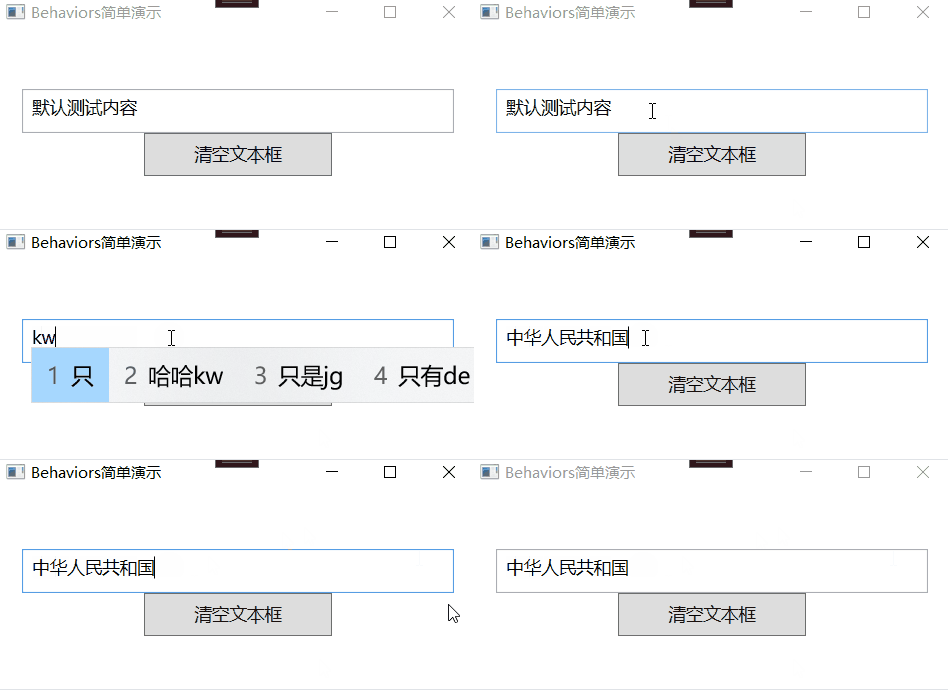
效果为:
启动程序,文本框显示「默认测试内容」。
用鼠标点击文本框的任意位置,文字会立即全选且稳定保持(背景高亮,无单独光标出现)。
此时可以直接输入新内容,会覆盖全选的文字(符合常规全选后的交互逻辑)。
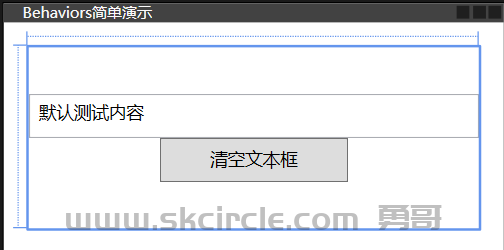
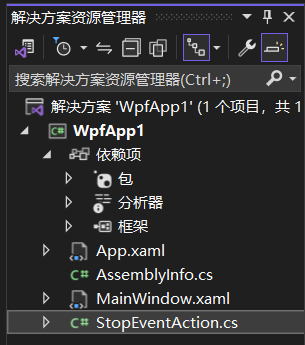
MainWindow.xaml
<Window x:Class="WpfApp1.MainWindow"
        xmlns="http://schemas.microsoft.com/winfx/2006/xaml/presentation"
        xmlns:x="http://schemas.microsoft.com/winfx/2006/xaml"
        xmlns:d="http://schemas.microsoft.com/expression/blend/2008"
        xmlns:mc="http://schemas.openxmlformats.org/markup-compatibility/2006"
        xmlns:local="clr-namespace:WpfApp1"
        mc:Ignorable="d"
        xmlns:i="http://schemas.microsoft.com/xaml/behaviors"
        Title="Behaviors简单演示" Height="200" Width="400">
    <Grid Margin="20">
        <!-- 布局:文本框 + 清空按钮 -->
        <StackPanel VerticalAlignment="Center" Margin="0,10,0,10">
            <!-- 文本框:实现「获得焦点时自动全选所有内容」 -->
            <TextBox x:Name="txtInput" Text="默认测试内容" FontSize="14" Height="35" Padding="5">
                <i:Interaction.Triggers>
                    <i:EventTrigger EventName="PreviewMouseDown">
                        <!-- 直接用自定义Action,包含所有逻辑 -->
                        <local:StopEventAndSelectAllAction/>
                    </i:EventTrigger>
                </i:Interaction.Triggers>
            </TextBox>


            <!-- 按钮:实现「点击时清空文本框内容」(这部分代码完全正确,无需修改) -->
            <Button Content="清空文本框" FontSize="14" Height="35" Width="150">
                <!-- 给Button附加Triggers(触发器集合) -->
                <i:Interaction.Triggers>
                    <!-- 事件触发器:绑定Button的Click事件 -->
                    <i:EventTrigger EventName="Click">
                        <!-- 事件触发后执行的动作:修改目标控件的属性(清空TextBox的Text) -->
                        <!-- 目标控件:上面的文本框 -->
                        <i:ChangePropertyAction
                            TargetObject="{Binding ElementName=txtInput}"
                            PropertyName="Text"
                            Value=""/>
                        <!-- 要修改的属性:Text -->
                        <!-- 要设置的属性值:空字符串 -->
                    </i:EventTrigger>
                </i:Interaction.Triggers>
            </Button>
        </StackPanel>
    </Grid>
</Window>
StopEventAction.cs
using Microsoft.Xaml.Behaviors;
using System;
using System.Collections.Generic;
using System.Linq;
using System.Text;
using System.Threading.Tasks;
using System.Windows;
using System.Windows.Controls;

namespace WpfApp1
{
    /// <summary>
    /// 自定义Action:阻止鼠标事件+给TextBox赋焦+全选文字
    /// </summary>
    // 泛型指定为TextBox,直接关联到TextBox控件(更精准)
    public class StopEventAndSelectAllAction : TriggerAction<TextBox>
    {
        protected override void Invoke(object parameter)
        {
            // 1. 阻止鼠标点击的默认行为(中断事件传递)
            if (parameter is RoutedEventArgs routedEventArgs)
            {
                routedEventArgs.Handled = true;
            }

            // 2. 给当前关联的TextBox赋焦+全选(直接操作控件,无方法调用问题)
            if (this.AssociatedObject != null)
            {
                this.AssociatedObject.Focus(); // 直接调用TextBox的Focus方法
                this.AssociatedObject.SelectAll(); // 直接调用全选方法
            }
        }
    }
}
通过上面的例子,你应该能体会到Microsoft.Xaml.Behaviors.Wpf(前身是 System.Windows.Interactivity)的核心价值是在不修改控件原有代码的前提下,通过 XAML 声明式的方式为控件添加交互行为,实现视图逻辑和业务逻辑的解耦。
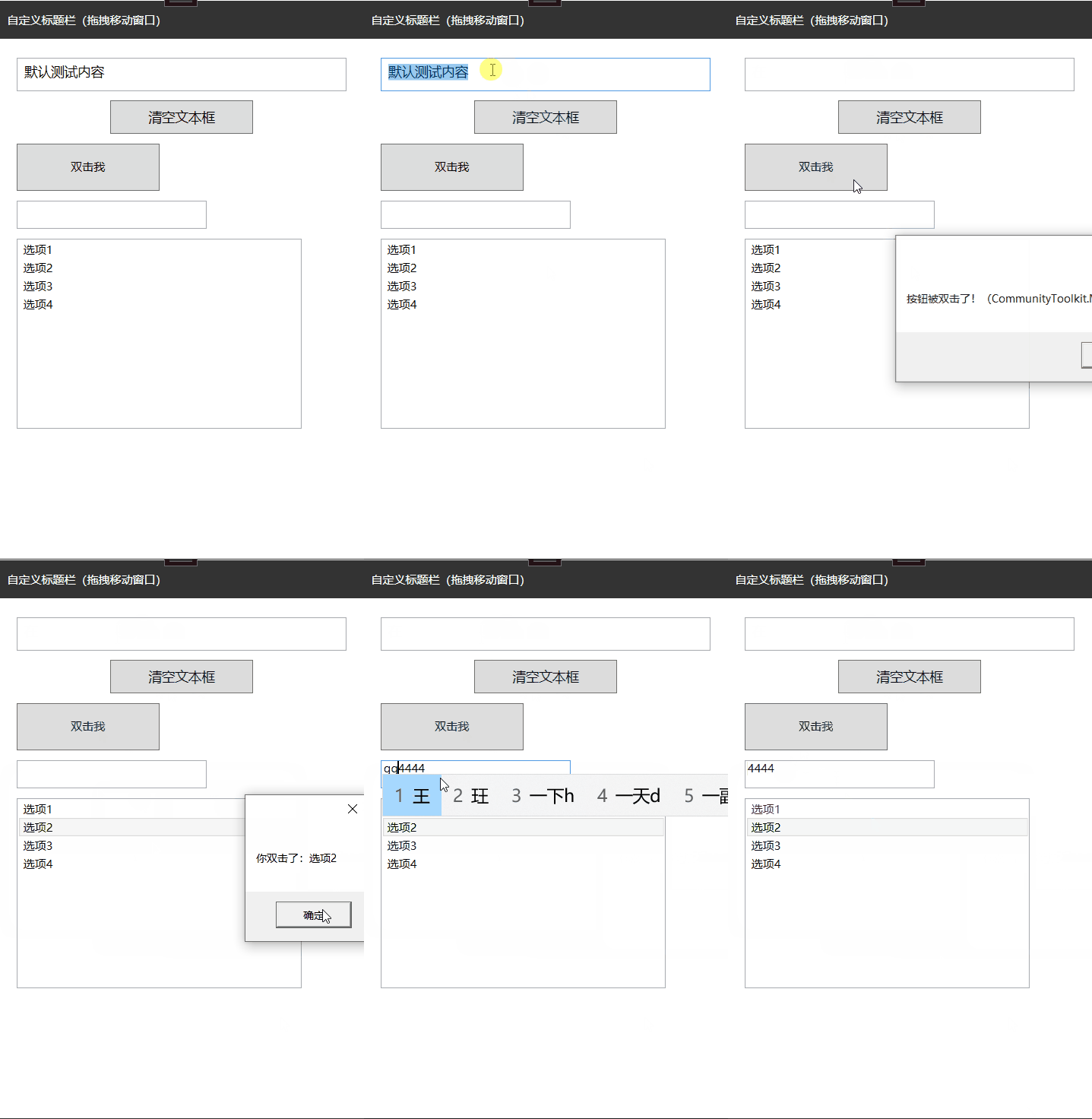
以上面例子,继续添加一些功能:
1. 无标题栏拖拽区域
2. 按钮双击示例
3. 数字输入限制TextBox
4. ListBox项双击示例
注:下面动图忘记了演示拖动标题栏,鼠标按住黑色标题栏是可以拖动的,这个窗口已经被禁止最小化最大化关闭按钮。
MainWindow.xaml
<Window x:Class="WpfApp1.MainWindow"
        xmlns="http://schemas.microsoft.com/winfx/2006/xaml/presentation"
        xmlns:x="http://schemas.microsoft.com/winfx/2006/xaml"
        xmlns:d="http://schemas.microsoft.com/expression/blend/2008"
        xmlns:mc="http://schemas.openxmlformats.org/markup-compatibility/2006"
        xmlns:local="clr-namespace:WpfApp1"
        mc:Ignorable="d"
        xmlns:i="http://schemas.microsoft.com/xaml/behaviors"

        Title="Behaviors简单演示" Height="600" Width="400"
        WindowStyle="None">
    <!-- 用于演示无标题栏拖拽 -->

    <!-- 主容器,无Margin,确保标题栏占据整个窗口顶部 -->
    <Grid>
        <!-- 1. 无标题栏拖拽区域:顶部,占据整个宽度 -->
        <Grid Height="40" Background="#333" VerticalAlignment="Top">
            <TextBlock Text="自定义标题栏(拖拽移动窗口)" Foreground="White" VerticalAlignment="Center" Margin="10,0"/>
            <i:Interaction.Behaviors>
                <local:WindowDragBehavior/>
            </i:Interaction.Behaviors>
        </Grid>

        <!-- 2. 内容区域:标题栏下方,带有适当Margin -->
        <StackPanel VerticalAlignment="Top" Margin="20,60,20,10">
            <!-- 文本框:实现「获得焦点时自动全选所有内容」 -->
            <TextBox x:Name="txtInput" Text="默认测试内容" FontSize="14" Height="35" Padding="5" Margin="0,0,0,10">
                <i:Interaction.Triggers>
                    <i:EventTrigger EventName="PreviewMouseDown">
                        <!-- 直接用自定义Action,包含所有逻辑 -->
                        <local:StopEventAndSelectAllAction/>
                    </i:EventTrigger>
                </i:Interaction.Triggers>
            </TextBox>

            <!-- 3. 按钮:实现「点击时清空文本框内容」(这部分代码完全正确,无需修改) -->
            <Button Content="清空文本框" FontSize="14" Height="35" Width="150" Margin="0,0,0,10">
                <!-- 给Button附加Triggers(触发器集合) -->
                <i:Interaction.Triggers>
                    <!-- 事件触发器:绑定Button的Click事件 -->
                    <i:EventTrigger EventName="Click">
                        <!-- 事件触发后执行的动作:修改目标控件的属性(清空TextBox的Text) -->
                        <!-- 目标控件:上面的文本框 -->
                        <i:ChangePropertyAction
                            TargetObject="{Binding ElementName=txtInput}"
                            PropertyName="Text"
                            Value=""/>
                        <!-- 要修改的属性:Text -->
                        <!-- 要设置的属性值:空字符串 -->
                    </i:EventTrigger>
                </i:Interaction.Triggers>
            </Button>

            <!-- 4. 按钮双击示例 -->
            <Button Content="双击我" Width="150" Height="50" HorizontalAlignment="Left" Margin="0,0,0,10">
                <i:Interaction.Behaviors>
                    <local:DoubleClickBehavior DoubleClickCommand="{Binding DoubleClickCommand}"/>
                </i:Interaction.Behaviors>
            </Button>

            <!-- 5. 数字输入限制TextBox -->
            <TextBox Width="200" Height="30" HorizontalAlignment="Left" Margin="0,0,0,10"
                 Text="只能输入数字">
                <i:Interaction.Behaviors>
                    <local:NumberOnlyBehavior/>
                </i:Interaction.Behaviors>
            </TextBox>

            <!-- 6. ListBox项双击示例 -->
            <ListBox Width="300" Height="200" HorizontalAlignment="Left"
                 ItemsSource="{Binding ItemList}">
                <i:Interaction.Behaviors>
                    <local:ListBoxItemDoubleClickBehavior ItemDoubleClickCommand="{Binding ItemDoubleClickCommand}"/>
                </i:Interaction.Behaviors>
                <ListBox.ItemTemplate>
                    <DataTemplate>
                        <TextBlock Text="{Binding}"/>
                    </DataTemplate>
                </ListBox.ItemTemplate>
            </ListBox>

        </StackPanel>
    </Grid>
</Window>
MainWindow.xaml.cs
using System.Text;
using System.Windows;
using System.Windows.Controls;
using System.Windows.Data;
using System.Windows.Documents;
using System.Windows.Input;
using System.Windows.Media;
using System.Windows.Media.Imaging;
using System.Windows.Navigation;
using System.Windows.Shapes;

namespace WpfApp1
{
    /// <summary>
    /// Interaction logic for MainWindow.xaml
    /// </summary>
    public partial class MainWindow : Window
    {
        public MainWindow()
        {
            InitializeComponent();
            DataContext = new MainWindowViewModel();
        }
    }
}
MainWindowViewModel.cs
using CommunityToolkit.Mvvm.ComponentModel;
using CommunityToolkit.Mvvm.Input;
using System;
using System.Collections.Generic;
using System.Linq;
using System.Text;
using System.Threading.Tasks;
using System.Windows;

namespace WpfApp1
{
    public partial class MainWindowViewModel:ObservableObject
    {
        // 列表数据源
        public List<string> ItemList { get; } = new List<string> { "选项1", "选项2", "选项3", "选项4" };

        // 🔥 核心改造:使用RelayCommand(CommunityToolkit.Mvvm的特性)
        // 无参数命令
        [RelayCommand]
        private void DoubleClick()
        {
            MessageBox.Show("按钮被双击了!(CommunityToolkit.Mvvm版)");
        }

        // 带参数命令(T为参数类型)
        [RelayCommand]
        private void ItemDoubleClick(string item)
        {
            if (!string.IsNullOrEmpty(item))
            {
                MessageBox.Show($"你双击了:{item}");
            }
        }
    }
}
StopEventAction.cs
using Microsoft.Xaml.Behaviors;
using System;
using System.Collections.Generic;
using System.Linq;
using System.Text;
using System.Threading.Tasks;
using System.Windows;
using System.Windows.Controls;
using System.Windows.Input;

namespace WpfApp1
{
    /// <summary>
    /// 自定义Action:阻止鼠标事件+给TextBox赋焦+全选文字
    /// </summary>
    // 泛型指定为TextBox,直接关联到TextBox控件(更精准)
    public class StopEventAndSelectAllAction : TriggerAction<TextBox>
    {
        protected override void Invoke(object parameter)
        {
            // 1. 阻止鼠标点击的默认行为(中断事件传递)
            if (parameter is RoutedEventArgs routedEventArgs)
            {
                routedEventArgs.Handled = true;
            }

            // 2. 给当前关联的TextBox赋焦+全选(直接操作控件,无方法调用问题)
            if (this.AssociatedObject != null)
            {
                this.AssociatedObject.Focus(); // 直接调用TextBox的Focus方法
                this.AssociatedObject.SelectAll(); // 直接调用全选方法
            }
        }
    }


    public class DoubleClickBehavior : Behavior<Button>
    {
        // 依赖属性(CommunityToolkit.Mvvm不影响这部分)
        public static readonly DependencyProperty DoubleClickCommandProperty =
            DependencyProperty.Register(
                nameof(DoubleClickCommand),
                typeof(ICommand),
                typeof(DoubleClickBehavior));

        public ICommand DoubleClickCommand
        {
            get => (ICommand)GetValue(DoubleClickCommandProperty);
            set => SetValue(DoubleClickCommandProperty, value);
        }

        protected override void OnAttached()
        {
            base.OnAttached();
            // 调试:检查行为是否正确附加
            System.Diagnostics.Debug.WriteLine("DoubleClickBehavior attached to: " + AssociatedObject?.GetType().Name);
            if (AssociatedObject != null)
            {
                System.Diagnostics.Debug.WriteLine("Attaching PreviewMouseLeftButtonDown event handler");
                AssociatedObject.PreviewMouseLeftButtonDown += OnPreviewMouseLeftButtonDown;
            }
        }

        protected override void OnDetaching()
        {
            base.OnDetaching();
            // 调试:检查行为是否正确分离
            System.Diagnostics.Debug.WriteLine("DoubleClickBehavior detaching from: " + AssociatedObject?.GetType().Name);
            if (AssociatedObject != null)
            {
                AssociatedObject.PreviewMouseLeftButtonDown -= OnPreviewMouseLeftButtonDown;
            }
        }

        private void OnPreviewMouseLeftButtonDown(object sender, MouseButtonEventArgs e)
        {
            // 调试:检查是否触发了鼠标按下事件
            System.Diagnostics.Debug.WriteLine($"PreviewMouseLeftButtonDown: ClickCount={e.ClickCount}");

            if (e.ClickCount == 2)
            {
                // 调试:检查是否检测到双击
                System.Diagnostics.Debug.WriteLine("Double click detected");

                // 检查命令是否存在
                if (DoubleClickCommand != null)
                {
                    System.Diagnostics.Debug.WriteLine("Command exists, executing...");
                    DoubleClickCommand.Execute(null);
                }
                else
                {
                    System.Diagnostics.Debug.WriteLine("Command is null");
                }
            }
        }
    }


    public class NumberOnlyBehavior : Behavior<TextBox>
    {
        private string _previousText = string.Empty;

        protected override void OnAttached()
        {
            base.OnAttached();
            // 拦截键盘输入
            AssociatedObject.PreviewTextInput += OnPreviewTextInput;
            // 拦截粘贴操作(正确的附加事件方式)
            DataObject.AddPastingHandler(AssociatedObject, OnPasting);
            // 禁止空格输入(可选,增强体验)
            AssociatedObject.PreviewKeyDown += OnPreviewKeyDown;
            // 监听文本变化,用于处理中文输入法输入的情况
            AssociatedObject.TextChanged += OnTextChanged;
            // 确保初始文本是纯数字,如果不是则清空
            if (!System.Text.RegularExpressions.Regex.IsMatch(AssociatedObject.Text, "^[0-9]*$"))
            {
                AssociatedObject.Text = "";
            }
            // 保存初始文本
            _previousText = AssociatedObject.Text;
        }

        protected override void OnDetaching()
        {
            base.OnDetaching();
            // 解绑事件,避免内存泄漏
            AssociatedObject.PreviewTextInput -= OnPreviewTextInput;
            DataObject.RemovePastingHandler(AssociatedObject, OnPasting);
            AssociatedObject.PreviewKeyDown -= OnPreviewKeyDown;
            AssociatedObject.TextChanged -= OnTextChanged;
        }

        // 拦截键盘输入:只允许数字
        private void OnPreviewTextInput(object sender, TextCompositionEventArgs e)
        {
            // 使用正则表达式判断输入的是否为纯数字,确保只允许0-9
            e.Handled = !System.Text.RegularExpressions.Regex.IsMatch(e.Text, "^[0-9]+$");
        }

        // 拦截粘贴操作:禁止粘贴非数字内容
        private void OnPasting(object sender, DataObjectPastingEventArgs e)
        {
            // 判断粘贴的内容是否为字符串
            if (e.DataObject.GetDataPresent(typeof(string)))
            {
                string pastedText = (string)e.DataObject.GetData(typeof(string));
                // 使用正则表达式判断粘贴的内容是否为纯数字
                if (!System.Text.RegularExpressions.Regex.IsMatch(pastedText, "^[0-9]+$"))
                {
                    e.CancelCommand();
                }
            }
            else
            {
                // 非字符串内容直接取消粘贴
                e.CancelCommand();
            }
        }

        // 可选:禁止空格输入(避免用户按空格输入无效字符)
        private void OnPreviewKeyDown(object sender, KeyEventArgs e)
        {
            if (e.Key == Key.Space)
            {
                e.Handled = true;
            }
        }

        // 处理文本变化事件,用于捕获中文输入法输入的情况
        private void OnTextChanged(object sender, TextChangedEventArgs e)
        {
            TextBox textBox = sender as TextBox;
            if (textBox == null) return;

            // 检查当前文本是否只包含数字
            if (!System.Text.RegularExpressions.Regex.IsMatch(textBox.Text, "^[0-9]*$"))
            {
                // 如果包含非数字字符,恢复到之前的文本
                int caretIndex = textBox.CaretIndex;
                textBox.Text = _previousText;
                // 尝试保持光标位置
                textBox.CaretIndex = Math.Min(caretIndex, _previousText.Length);
            }
            else
            {
                // 如果文本有效,更新之前的文本
                _previousText = textBox.Text;
            }
        }
    }


    public class WindowDragBehavior : Behavior<Grid>
    {
        private Point _startPoint;
        private bool _isDragging;

        protected override void OnAttached()
        {
            base.OnAttached();
            AssociatedObject.MouseLeftButtonDown += OnMouseLeftButtonDown;
            AssociatedObject.MouseLeftButtonUp += OnMouseLeftButtonUp;
            AssociatedObject.MouseMove += OnMouseMove;
        }

        protected override void OnDetaching()
        {
            base.OnDetaching();
            AssociatedObject.MouseLeftButtonDown -= OnMouseLeftButtonDown;
            AssociatedObject.MouseLeftButtonUp -= OnMouseLeftButtonUp;
            AssociatedObject.MouseMove -= OnMouseMove;
        }

        private void OnMouseLeftButtonDown(object sender, MouseButtonEventArgs e)
        {
            _isDragging = true;
            _startPoint = e.GetPosition(Application.Current.MainWindow);
            AssociatedObject.CaptureMouse();
        }

        private void OnMouseLeftButtonUp(object sender, MouseButtonEventArgs e)
        {
            _isDragging = false;
            AssociatedObject.ReleaseMouseCapture();
        }

        private void OnMouseMove(object sender, MouseEventArgs e)
        {
            if (_isDragging && e.LeftButton == MouseButtonState.Pressed)
            {
                Window window = Application.Current.MainWindow;
                Point currentPoint = e.GetPosition(window);
                window.Left += currentPoint.X - _startPoint.X;
                window.Top += currentPoint.Y - _startPoint.Y;
            }
        }
    }


    public class ListBoxItemDoubleClickBehavior : Behavior<ListBox>
    {
        public static readonly DependencyProperty ItemDoubleClickCommandProperty =
            DependencyProperty.Register(
                nameof(ItemDoubleClickCommand),
                typeof(ICommand),
                typeof(ListBoxItemDoubleClickBehavior));

        public ICommand ItemDoubleClickCommand
        {
            get => (ICommand)GetValue(ItemDoubleClickCommandProperty);
            set => SetValue(ItemDoubleClickCommandProperty, value);
        }

        protected override void OnAttached()
        {
            base.OnAttached();
            AssociatedObject.MouseDoubleClick += OnMouseDoubleClick;
        }

        protected override void OnDetaching()
        {
            base.OnDetaching();
            AssociatedObject.MouseDoubleClick -= OnMouseDoubleClick;
        }

        private void OnMouseDoubleClick(object sender, MouseButtonEventArgs e)
        {
            ListBox listBox = sender as ListBox;
            if (listBox?.SelectedItem != null && ItemDoubleClickCommand?.CanExecute(listBox.SelectedItem) == true)
            {
                ItemDoubleClickCommand.Execute(listBox.SelectedItem);
            }
        }
    }


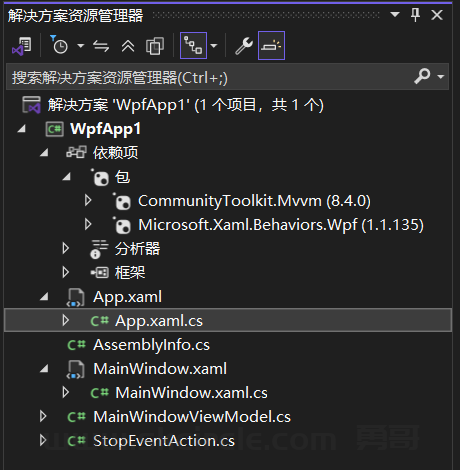
}
说明:
(一)基本使用方式
<!-- 6. ListBox项双击示例 -->
            <ListBox Width="300" Height="200" HorizontalAlignment="Left"
                 ItemsSource="{Binding ItemList}">
                <i:Interaction.Behaviors>
                    <local:ListBoxItemDoubleClickBehavior ItemDoubleClickCommand="{Binding ItemDoubleClickCommand}"/>
                </i:Interaction.Behaviors>
                <ListBox.ItemTemplate>
                    <DataTemplate>
                        <TextBlock Text="{Binding}"/>
                    </DataTemplate>
                </ListBox.ItemTemplate>
            </ListBox>
上面的xaml代码演示了基本的使用方式:
1. Interaction.Behaviors 附加属性
这是 Microsoft.Xaml.Behaviors 库提供的 核心附加属性 ,用于:
- 向任何 UI 元素(这里是 ListBox)添加行为集合
- 允许在 XAML 中声明式地配置行为
- 提供了一种将行为与控件关联的标准方式
2. 行为的声明式配置
通过 <local:ListBoxItemDoubleClickBehavior .../> 语法:
- 实例化了一个自定义行为 ListBoxItemDoubleClickBehavior
- 将其添加到 ListBox 的行为集合中
- 实现了 UI 逻辑与业务逻辑的分离
3. 行为属性的绑定
通过 ItemDoubleClickCommand="{Binding ItemDoubleClickCommand}" :
- 利用 WPF 的数据绑定机制,将行为的命令属性绑定到 ViewModel 的命令
- 实现了行为与业务逻辑的解耦
- 使行为可以接收来自外部的参数和命令
4. 行为的类型安全
ListBoxItemDoubleClickBehavior 继承自 Behavior<ListBox> :
- 使用了泛型约束,确保行为只能附加到 ListBox 类型的控件
- 提供了类型安全的 AssociatedObject 属性,方便在行为中访问目标控件
5. 事件处理的封装
整个行为的核心功能是:
- 封装了 ListBox 的 MouseDoubleClick 事件处理
- 提供了一个命令接口,将事件转换为命令
- 实现了从事件触发到命令执行的完整流程
总结
Microsoft.Xaml.Behaviors 库的这些特性使得:
- UI 逻辑可以被封装到可重用的行为中
- 事件处理可以通过命令模式与业务逻辑解耦
- XAML 代码更加清晰、可维护
- 行为可以被多个控件复用
这就是为什么这个库在 WPF 开发中如此受欢迎的原因。
(二) Microsoft.Xaml.Behaviors的好处
在这个例子里,如果不使用 Microsoft.Xaml.Behaviors 的主要问题:
1. 代码分散 :需要在 XAML、code-behind、ViewModel 中分别处理
2. 耦合度高 :UI 事件处理与业务逻辑难以分离
3. 重用性差 :每个控件都需要单独编写事件处理代码
4. 维护困难 :修改功能时需要修改多个地方
5. 容易出错 :忘记注销事件会导致内存泄漏
Microsoft.Xaml.Behaviors 库通过提供标准化的行为框架,大大简化了这些问题的处理,
让代码更加清晰、可维护和可重
而采用Microsoft.Xaml.Behaviors后:
会让code-behind的代码极大减少(code-behind就是xaml对应的那个cs文件)。
我们知道在不同的开发模式下,code-behind 的使用方式不同:
传统模式(代码隐藏)
- 包含大量 UI 事件处理代码
- 直接操作 UI 元素
- 业务逻辑与 UI 逻辑混合
MVVM 模式(推荐)
- 应尽可能精简
- 主要用于:
1. 窗口/页面的初始化
2. 设置 DataContext
3. 处理纯 UI 相关的事件(不涉及业务逻辑)
- 业务逻辑应放在 ViewModel 中
Microsoft.Xaml.Behaviors 库的一个重要优势就是 减少 code-behind 代码 ,
将 UI 事件处理逻辑封装到行为中,使得:
- XAML 更加清晰
- 行为可以重用
- 业务逻辑与 UI 逻辑完全分离
所以在使用 Microsoft.Xaml.Behaviors 时,通常可以保持 code-behind 文件非常简洁,甚至为空。