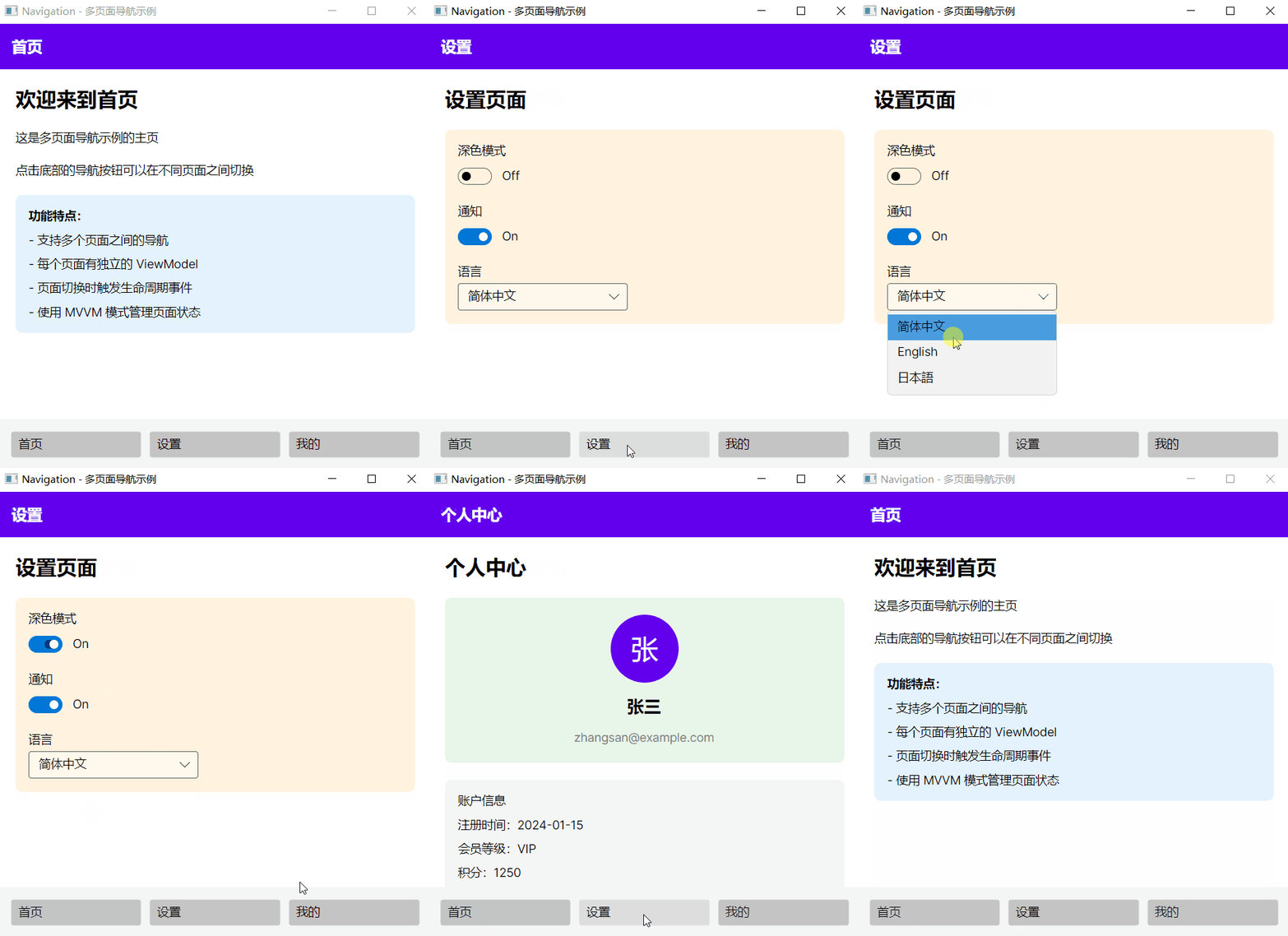
页面导航
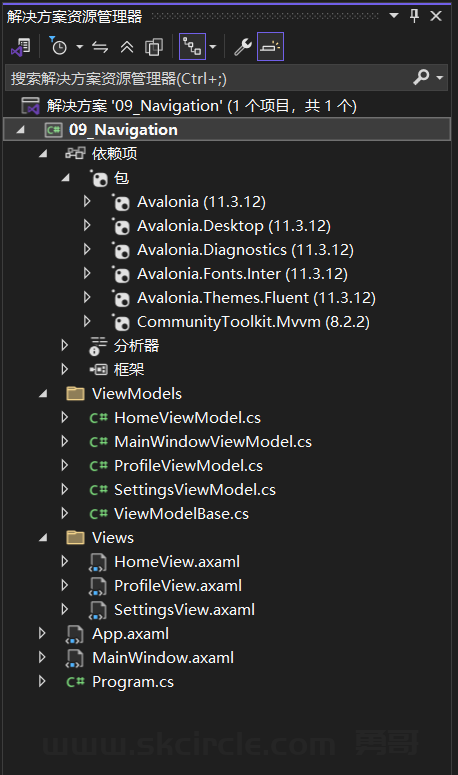
HomeViewModel.cs
namespace _09_Navigation.ViewModels;

public partial class HomeViewModel : ViewModelBase
{
    public override void OnNavigatedTo()
    {
        System.Console.WriteLine("Home page activated");
    }
}
MainWindowViewModel.cs
using CommunityToolkit.Mvvm.ComponentModel;
using CommunityToolkit.Mvvm.Input;

namespace _09_Navigation.ViewModels;

public partial class MainWindowViewModel : ObservableObject
{
    [ObservableProperty]
    private ViewModelBase _currentPage = new HomeViewModel();

    [ObservableProperty]
    private string _currentPageTitle = "首页";

    [RelayCommand]
    private void NavigateToHome()
    {
        CurrentPage.OnNavigatedFrom();
        CurrentPage = new HomeViewModel();
        CurrentPage.OnNavigatedTo();
        CurrentPageTitle = "首页";
    }

    [RelayCommand]
    private void NavigateToSettings()
    {
        CurrentPage.OnNavigatedFrom();
        CurrentPage = new SettingsViewModel();
        CurrentPage.OnNavigatedFrom();
        CurrentPageTitle = "设置";
    }

    [RelayCommand]
    private void NavigateToProfile()
    {
        CurrentPage.OnNavigatedFrom();
        CurrentPage = new ProfileViewModel();
        CurrentPage.OnNavigatedTo();
        CurrentPageTitle = "个人中心";
    }
}
ProfileViewModel.cs
namespace _09_Navigation.ViewModels;

public partial class ProfileViewModel : ViewModelBase
{
    public string Title => "个人中心";
    public string UserName { get; set; } = "张三";
    public string Email { get; set; } = "zhangsan@example.com";
}
SettingsViewModel.cs
namespace _09_Navigation.ViewModels;

public partial class SettingsViewModel : ViewModelBase
{
    public string Title => "设置页面";
}
ViewModelBase.cs
using CommunityToolkit.Mvvm.ComponentModel;

namespace _09_Navigation.ViewModels;

public partial class ViewModelBase : ObservableObject
{
    public virtual void OnNavigatedTo() { }
    public virtual void OnNavigatedFrom() { }
}
HomeView.axaml
<UserControl xmlns="https://github.com/avaloniaui"
             xmlns:x="http://schemas.microsoft.com/winfx/2006/xaml"
             xmlns:vm="clr-namespace:_09_Navigation.ViewModels"
             x:Class="_09_Navigation.Views.HomeView"
             x:DataType="vm:HomeViewModel">
  <StackPanel Spacing="20" Margin="20">
    <TextBlock Text="欢迎来到首页" FontSize="24" FontWeight="Bold"/>
    <TextBlock Text="这是多页面导航示例的主页"/>
    <TextBlock Text="点击底部的导航按钮可以在不同页面之间切换"/>
    <Border Background="#E3F2FD" Padding="15" CornerRadius="8">
      <StackPanel Spacing="10">
        <TextBlock Text="功能特点:" FontWeight="Bold"/>
        <TextBlock Text="- 支持多个页面之间的导航"/>
        <TextBlock Text="- 每个页面有独立的 ViewModel"/>
        <TextBlock Text="- 页面切换时触发生命周期事件"/>
        <TextBlock Text="- 使用 MVVM 模式管理页面状态"/>
      </StackPanel>
    </Border>
  </StackPanel>
</UserControl>
ProfileView.axaml
<UserControl xmlns="https://github.com/avaloniaui"
             xmlns:x="http://schemas.microsoft.com/winfx/2006/xaml"
             xmlns:vm="clr-namespace:_09_Navigation.ViewModels"
             x:Class="_09_Navigation.Views.ProfileView"
             x:DataType="vm:ProfileViewModel">
  <StackPanel Spacing="20" Margin="20">
    <TextBlock Text="个人中心" FontSize="24" FontWeight="Bold"/>
    <Border Background="#E8F5E9" Padding="20" CornerRadius="8">
      <StackPanel Spacing="15" HorizontalAlignment="Center">
        <Border Width="80" Height="80" Background="#6200EE" CornerRadius="40">
          <TextBlock Text="张"
                     FontSize="32"
                     Foreground="White"
                     HorizontalAlignment="Center"
                     VerticalAlignment="Center"/>
        </Border>
        <TextBlock Text="{Binding UserName}"
                   FontSize="20"
                   FontWeight="Bold"
                   HorizontalAlignment="Center"/>
        <TextBlock Text="{Binding Email}"
                   FontSize="14"
                   Foreground="Gray"
                   HorizontalAlignment="Center"/>
      </StackPanel>
    </Border>
    <Border Background="#F5F5F5" Padding="15" CornerRadius="8">
      <StackPanel Spacing="10">
        <TextBlock Text="账户信息"/>
        <TextBlock Text="注册时间:2024-01-15"/>
        <TextBlock Text="会员等级:VIP"/>
        <TextBlock Text="积分:1250"/>
      </StackPanel>
    </Border>
  </StackPanel>
</UserControl>
SettingsView.axaml
<UserControl xmlns="https://github.com/avaloniaui"
             xmlns:x="http://schemas.microsoft.com/winfx/2006/xaml"
             xmlns:vm="clr-namespace:_09_Navigation.ViewModels"
             x:Class="_09_Navigation.Views.SettingsView"
             x:DataType="vm:SettingsViewModel">
  <StackPanel Spacing="20" Margin="20">
    <TextBlock Text="设置页面" FontSize="24" FontWeight="Bold"/>
    <Border Background="#FFF3E0" Padding="15" CornerRadius="8">
      <StackPanel Spacing="15">
        <StackPanel Spacing="5">
          <TextBlock Text="深色模式"/>
          <ToggleSwitch IsChecked="False"/>
        </StackPanel>
        <StackPanel Spacing="5">
          <TextBlock Text="通知"/>
          <ToggleSwitch IsChecked="True"/>
        </StackPanel>
        <StackPanel Spacing="5">
          <TextBlock Text="语言"/>
          <ComboBox SelectedIndex="0" Width="200">
            <ComboBoxItem>简体中文</ComboBoxItem>
            <ComboBoxItem>English</ComboBoxItem>
            <ComboBoxItem>日本語</ComboBoxItem>
          </ComboBox>
        </StackPanel>
      </StackPanel>
    </Border>
  </StackPanel>
</UserControl>
App.axaml
<Application xmlns="https://github.com/avaloniaui"
             xmlns:x="http://schemas.microsoft.com/winfx/2006/xaml"
             x:Class="_09_Navigation.App">
    <!-- 应用主题 -->
    <Application.Styles>
        <FluentTheme  /> <!-- Light=浅色 / Dark=深色 / 不写=跟随系统 -->
    </Application.Styles>
</Application>
MainWindow.axaml
<Window xmlns="https://github.com/avaloniaui"
        xmlns:x="http://schemas.microsoft.com/winfx/2006/xaml"
        xmlns:vm="clr-namespace:_09_Navigation.ViewModels"
        xmlns:views="clr-namespace:_09_Navigation.Views"
        x:Class="_09_Navigation.MainWindow"
          x:DataType="vm:MainWindowViewModel"
        Title="Navigation - 多页面导航示例"
        Width="500"
        Height="450">
  <Window.DataContext>
    <vm:MainWindowViewModel/>
  </Window.DataContext>

  <DockPanel>
    <Border DockPanel.Dock="Top"
            Background="#6200EE"
            Padding="15">
      <TextBlock Text="{Binding CurrentPageTitle}"
                 FontSize="18"
                 FontWeight="Bold"
                 Foreground="White"/>
    </Border>

    <Border DockPanel.Dock="Bottom"
            Background="#F5F5F5"
            Padding="10">
      <Grid ColumnDefinitions="*,*,*">
        <Button Grid.Column="0"
                Content="首页"
                Command="{Binding NavigateToHomeCommand}"
                HorizontalAlignment="Stretch"
                Margin="5"/>
        <Button Grid.Column="1"
                Content="设置"
                Command="{Binding NavigateToSettingsCommand}"
                HorizontalAlignment="Stretch"
                Margin="5"/>
        <Button Grid.Column="2"
                Content="我的"
                Command="{Binding NavigateToProfileCommand}"
                HorizontalAlignment="Stretch"
                Margin="5"/>
      </Grid>
    </Border>

    <ContentControl Content="{Binding CurrentPage}">
      <ContentControl.DataTemplates>
        <DataTemplate DataType="vm:HomeViewModel">
          <views:HomeView/>
        </DataTemplate>
        <DataTemplate DataType="vm:SettingsViewModel">
          <views:SettingsView/>
        </DataTemplate>
        <DataTemplate DataType="vm:ProfileViewModel">
          <views:ProfileView/>
        </DataTemplate>
      </ContentControl.DataTemplates>
    </ContentControl>
  </DockPanel>
</Window>
效果: