SSE 特点:
服务端单向推数据给前端,前端不能通过这条长连接下发指令;
前端要下发控制指令需要单独 HTTP POST 接口
演示程序包含:
1. C# WinForm:内置 HttpListener 承载 SSE 服务 + WebView2 加载本地 html
2. html 页面:EventSource 接收 SSE 推送,额外加 POST 按钮下发指令(弥补 SSE 不能上行的短板)
端口:SSE 监听 `http://127.0.0.1:8282/sse`,指令接口 `http://127.0.0.1:8282/cmd`
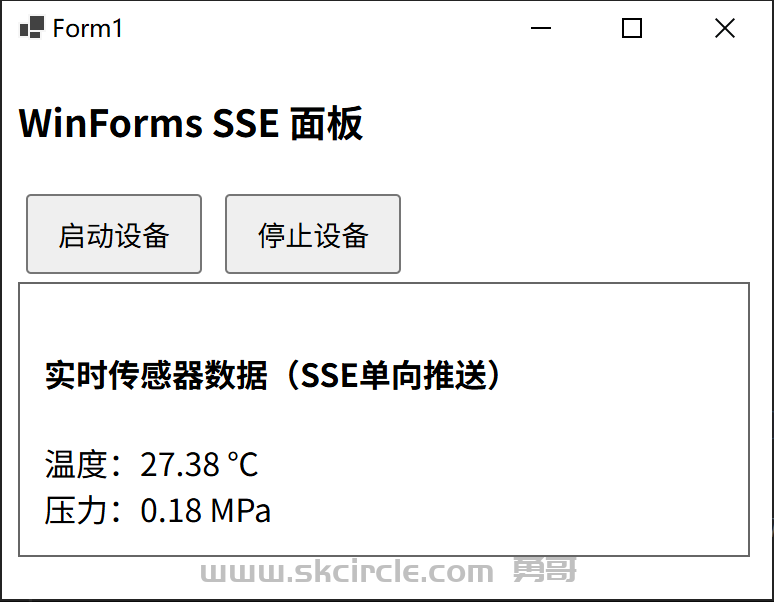
要点
1. NuGet 只需要安装`Microsoft.Web.WebView2`,不需要 Fleck
2. html 文件属性:生成操作:内容;复制到输出目录:如果较新则复制
3. 启动程序:
- SSE 长连接持续推送温压数据
- 点击【启动 / 停止】按钮,走 HTTP POST 下发指令给 C#
- 关掉页面再打开,EventSource**浏览器自动重连 SSE**(SSE 核心特性)
和 WebSocket 对比(工控重点)
- SSE:单向数据流,前端下发指令必须额外 HTTP POST 接口;断线浏览器自动重连;适合大量只读大屏
- WebSocket:单条连接双向收发;要自己写 JS 断线重连;适合带操作按钮的工控面板
小坑提醒
1. HttpListener 需要权限,如果局域网其他设备访问,需要给 http 前缀注册权限(本机 127.0.0.1 不用)
2. SSE 只能传输文本,**不支持二进制**
3. 浏览器对同一个域名 SSE 并发连接有限制(最多 6 个),多客户端场景注意
C#代码:
using Microsoft.Web.WebView2.WinForms;
using System.Net;
using System.Text;

namespace WinFormsApp1
{
    public partial class Form1 : Form
    {
        private string _lastSensorJson = "{\"Temp\":0,\"Press\":0,\"DeviceRunning\":false}";
        private bool _deviceRunning = false;
        private readonly WebView2 webView;
        private HttpListener _httpListener;
        private readonly System.Timers.Timer _simTimer;


        public Form1()
        {
            InitializeComponent();
            webView = new WebView2();
            webView.Dock = DockStyle.Fill;
            this.Controls.Add(webView);

            _simTimer = new System.Timers.Timer(800);
            _simTimer.Elapsed += (s, e) =>
            {
                double temp = 25 + Math.Sin(DateTime.Now.Second) * 6;
                double press = 0.35 + Math.Cos(DateTime.Now.Millisecond / 250.0) * 0.22;
                _lastSensorJson = $"{{\"Temp\":{temp:F2},\"Press\":{press:F2}}}";
            };
            _simTimer.Start();

            StartSseHttpServer();
            _ = InitWebViewAsync();
        }

        #region SSE Http服务
        private void StartSseHttpServer()
        {
            _httpListener = new HttpListener();
            _httpListener.Prefixes.Add("http://127.0.0.1:8282/");
            _httpListener.Start();
            Console.WriteLine("SSE服务启动:http://127.0.0.1:8282");

            // 异步循环等待客户端请求
            _ = AcceptRequestLoop();
        }

        private async System.Threading.Tasks.Task AcceptRequestLoop()
        {
            while (_httpListener.IsListening)
            {
                HttpListenerContext ctx = null;
                try
                {
                    ctx = await _httpListener.GetContextAsync();
                }
                catch
                {
                    break;
                }
                // 重点:新开Task处理每一个请求,SSE长连接不会阻塞新请求接入
                _ = HandleSingleRequest(ctx);
            }
        }

        // 单独处理单个请求(SSE长连接 /cmd短连接 在这里)
        private async Task HandleSingleRequest(HttpListenerContext ctx)
        {
            var req = ctx.Request;
            var resp = ctx.Response;
            try
            {
                // SSE数据流接口
                if (req.Url.AbsolutePath == "/sse")
                {
                    resp.ContentType = "text/event-stream";
                    resp.Headers.Add("Cache-Control", "no-cache");
                    resp.Headers.Add("Connection", "keep-alive");
                    resp.Headers.Add("X-Content-Type-Options", "nosniff");
                    resp.Headers.Add("Access-Control-Allow-Origin", "*");

                    using var stream = resp.OutputStream;
                    using var writer = new StreamWriter(stream, Encoding.UTF8) { AutoFlush = true };

                    while (_httpListener.IsListening)
                    {
                        string sseMsg = $"data: {_lastSensorJson}\n\n";
                        try
                        {
                            await writer.WriteAsync(sseMsg);
                            await writer.FlushAsync();
                        }
                        catch
                        {
                            // 客户端断开,退出循环
                            break;
                        }
                        await Task.Delay(800);
                    }
                }
                // HTTP POST 指令接口:前端下发控制指令
                else if (req.Url.AbsolutePath == "/cmd" && req.HttpMethod == "POST")
                {
                    string body;
                    using (var reader = new StreamReader(req.InputStream, req.ContentEncoding))
                    {
                        body = await reader.ReadToEndAsync();
                    }
                    Console.WriteLine($"收到前端控制指令:{body}");

                    if (body == "START")
                    {
                        _deviceRunning = true;
                    }
                    else if (body == "STOP")
                    {
                        _deviceRunning = false;
                    }

                    string ret = $"C#收到指令【{body}】 {DateTime.Now:HH:mm:ss}";
                    byte[] buffer = Encoding.UTF8.GetBytes(ret);
                    resp.Headers.Add("Access-Control-Allow-Origin", "*");
                    resp.ContentType = "text/plain";
                    resp.ContentLength64 = buffer.Length;
                    await resp.OutputStream.WriteAsync(buffer);
                    await resp.OutputStream.FlushAsync(); // 必须刷入
                }
                else
                {
                    resp.StatusCode = 404;
                }
            }
            catch (Exception ex)
            {
                Console.WriteLine($"请求异常: {ex.Message}");
            }
            finally
            {
                resp.Close();
            }
        }


        #endregion

        #region WebView2加载本地页面
        private async System.Threading.Tasks.Task InitWebViewAsync()
        {
            await webView.EnsureCoreWebView2Async(null);
            var core = webView.CoreWebView2;
            core.Settings.AreDevToolsEnabled = true;

            string htmlPath = Path.Combine(Application.StartupPath, "ui", "sse_index.html");
            string htmlUrl = new Uri(htmlPath).AbsoluteUri;
            core.Navigate(htmlUrl);
        }
        #endregion

        protected override void OnFormClosed(FormClosedEventArgs e)
        {
            _simTimer?.Stop();
            _simTimer?.Dispose();

            if (_httpListener != null && _httpListener.IsListening)
            {
                _httpListener.Stop();
                _httpListener.Close();
            }
            base.OnFormClosed(e);
        }
    }
}
html代码:
<!DOCTYPE html>
<html>
<head>
    <meta charset="UTF-8">
    <style>
        .card {border:1px solid #666;padding:12px;width:340px;}
        button {padding:8px 14px;font-size:14px;margin:4px;}
    </style>
</head>
<body>
    <h3>WinForms SSE 面板</h3>
    <div>
        <button onclick="SendCmd('START')">启动设备</button>
        <button onclick="SendCmd('STOP')">停止设备</button>
    </div>
    <div id="cmdResult"></div>

    <div>
        <h4>实时传感器数据(SSE单向推送)</h4>
        <div>温度:<span id="temp">--</span> ℃</div>
        <div>压力:<span id="press">--</span> MPa</div>
    </div>

<script>
// SSE 接收实时数据,浏览器自带断线自动重连
const evtSource = new EventSource("http://127.0.0.1:8282/sse");

evtSource.onmessage = function (e) {
    if (!e.data) return; // 空消息直接跳过
    try {
        const data = JSON.parse(e.data);
        document.getElementById("temp").innerText = data.Temp;
        document.getElementById("press").innerText = data.Press;
        document.getElementById("devStatus").innerText = data.DeviceRunning ? "运行中" : "已停止";
    } catch (err) {
        console.log("JSON解析忽略异常", err, e.data);
    }
}

evtSource.onerror = function(err) {
    console.error("SSE异常", err);
};

// 单独POST接口下发控制指令
async function SendCmd(cmdText){
    const res = await fetch("http://127.0.0.1:8282/cmd",{
        method:"POST",
        body: cmdText
    });
    const txt = await res.text();
    document.getElementById("cmdResult").innerText = txt;
}
</script>
</body>
</html>